De-shittify Your Privacy
Your attention is the product. Your data is the raw material. These steps disrupt the surveillance pipeline, starting with the changes that make the biggest difference for the least effort.
This guide assumes you're on a computer using a web browser like Firefox or Chrome. That's intentional. On the web, you have real power: ad blockers strip out trackers, browser extensions enforce your privacy choices, and you control what runs on your machine.
Companies know this—which is why they constantly nag you to “use our app.” Apps bypass all of it. There are no ad blockers inside apps, no extensions, no content filtering. Apps can access device identifiers, run background tracking, and collect data through SDKs that you never see and can't block. When Apple introduced App Tracking Transparency in 2021—simply asking users if they wanted to be tracked—Meta ran full-page newspaper ads fighting it and reported a $10 billion revenue hit when users said no. That's how much your app data is worth to them.
The single best privacy move on your phone is to use the browser instead of the app whenever possible. Most services work fine in a mobile browser—the app exists to surveil you, not to serve you.
1. Install an ad blocker
This is the single highest-impact, lowest-effort thing you can do for your privacy. Install uBlock Origin (3)—it's free, open source, and works immediately. No configuration needed.
An ad blocker doesn't just remove annoying ads. It blocks trackers that follow you across websites, malware delivered through ad networks, and deceptive “sponsored” content designed to look like real results.
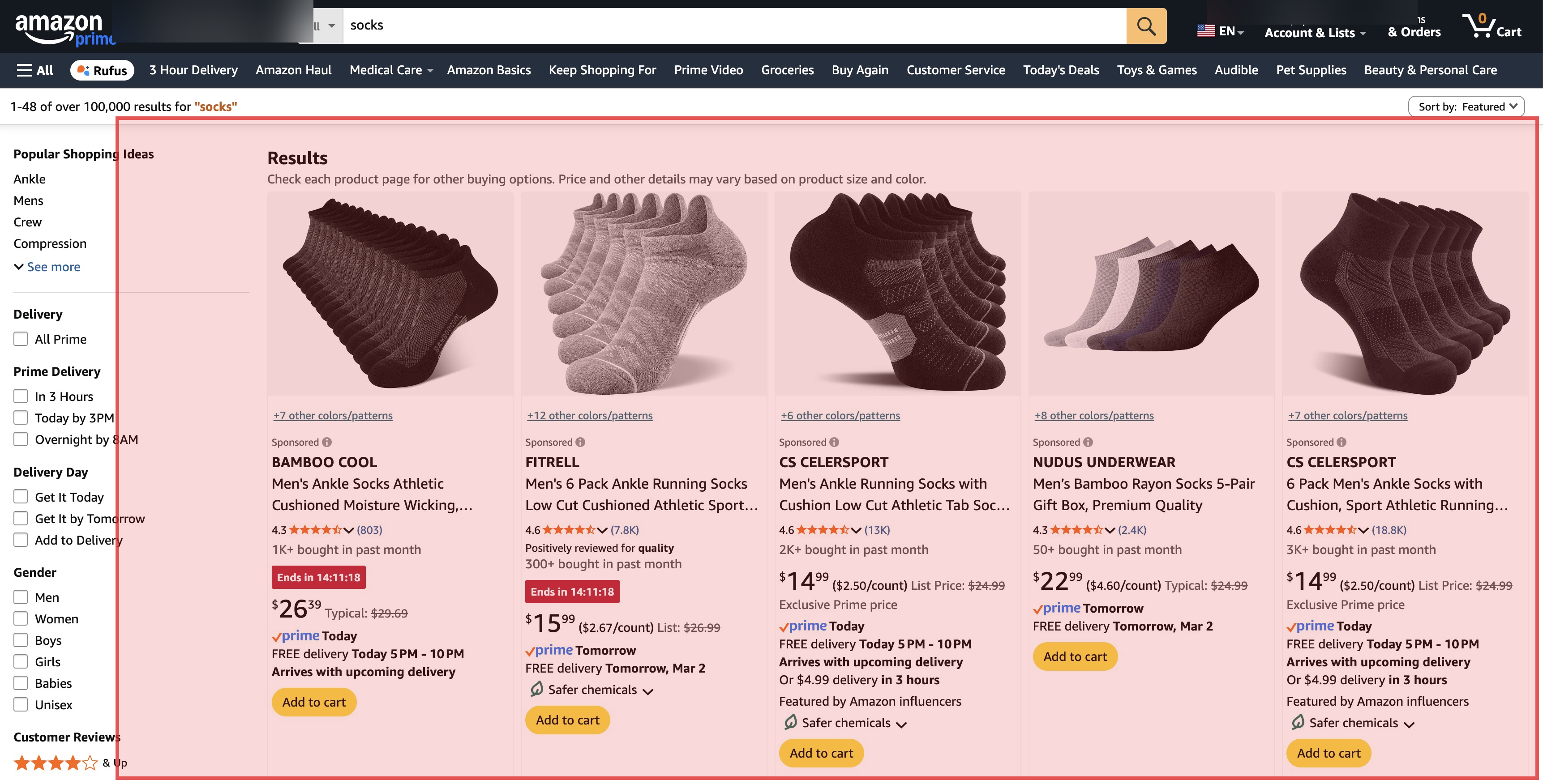
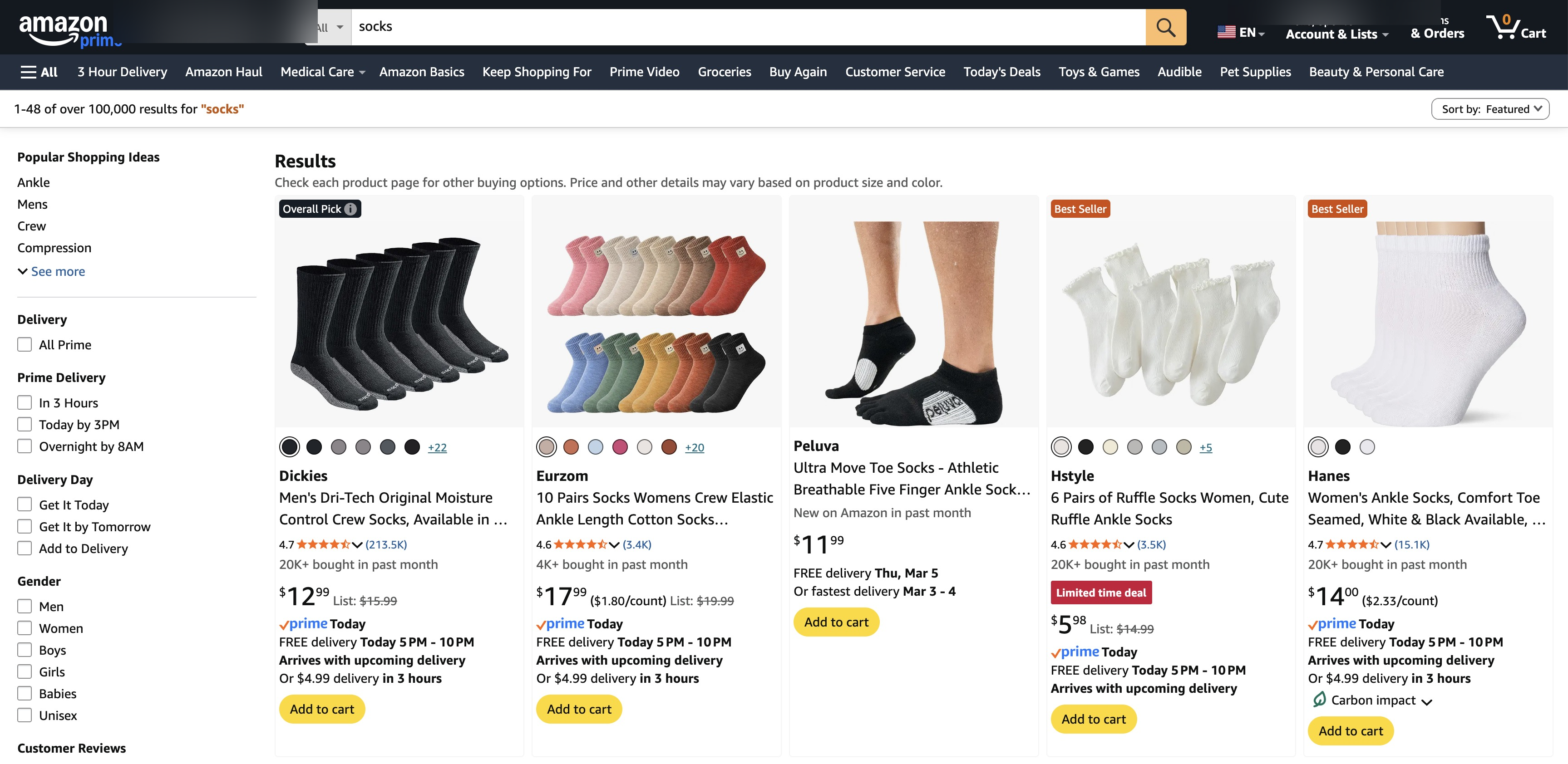
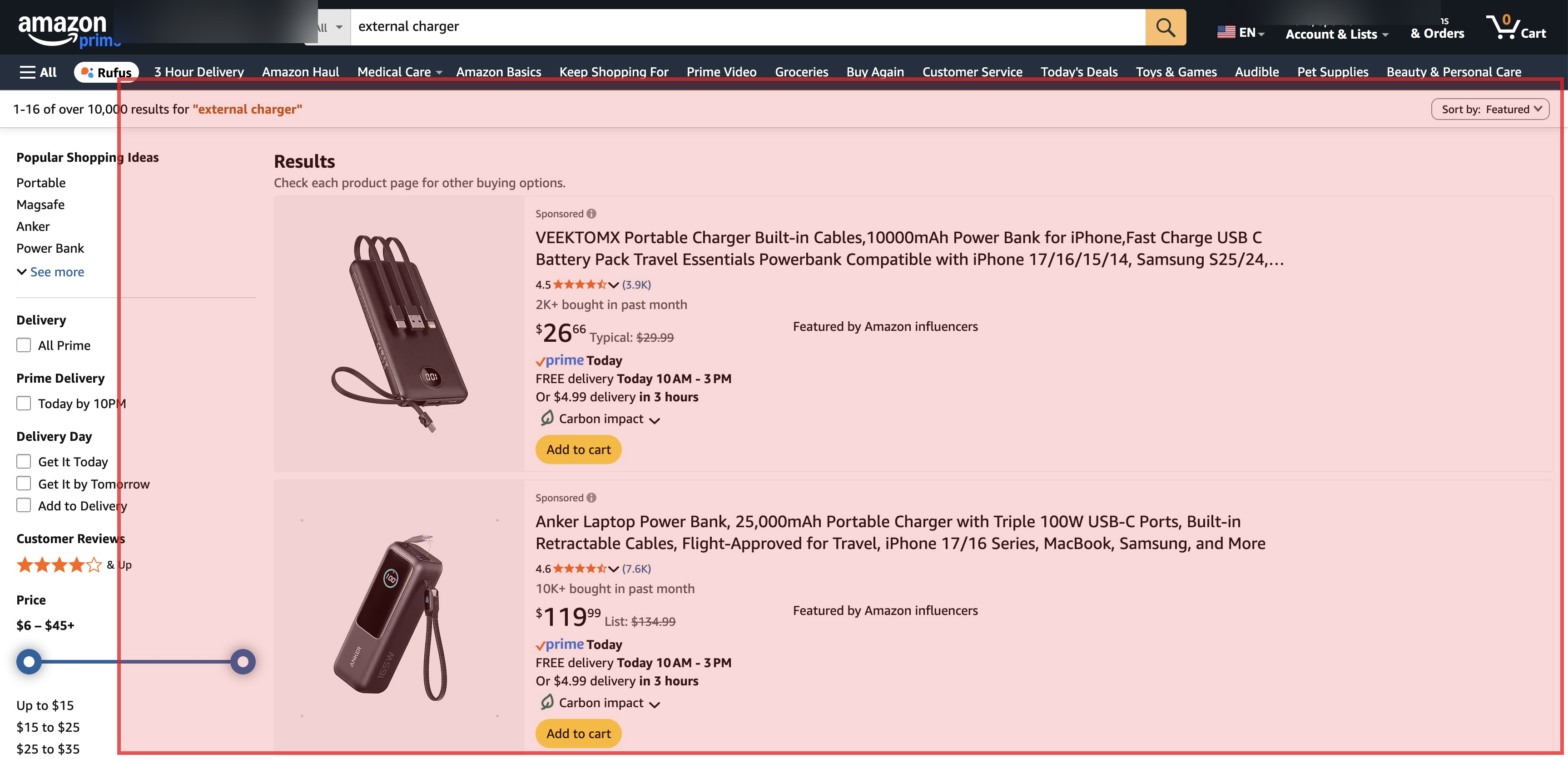
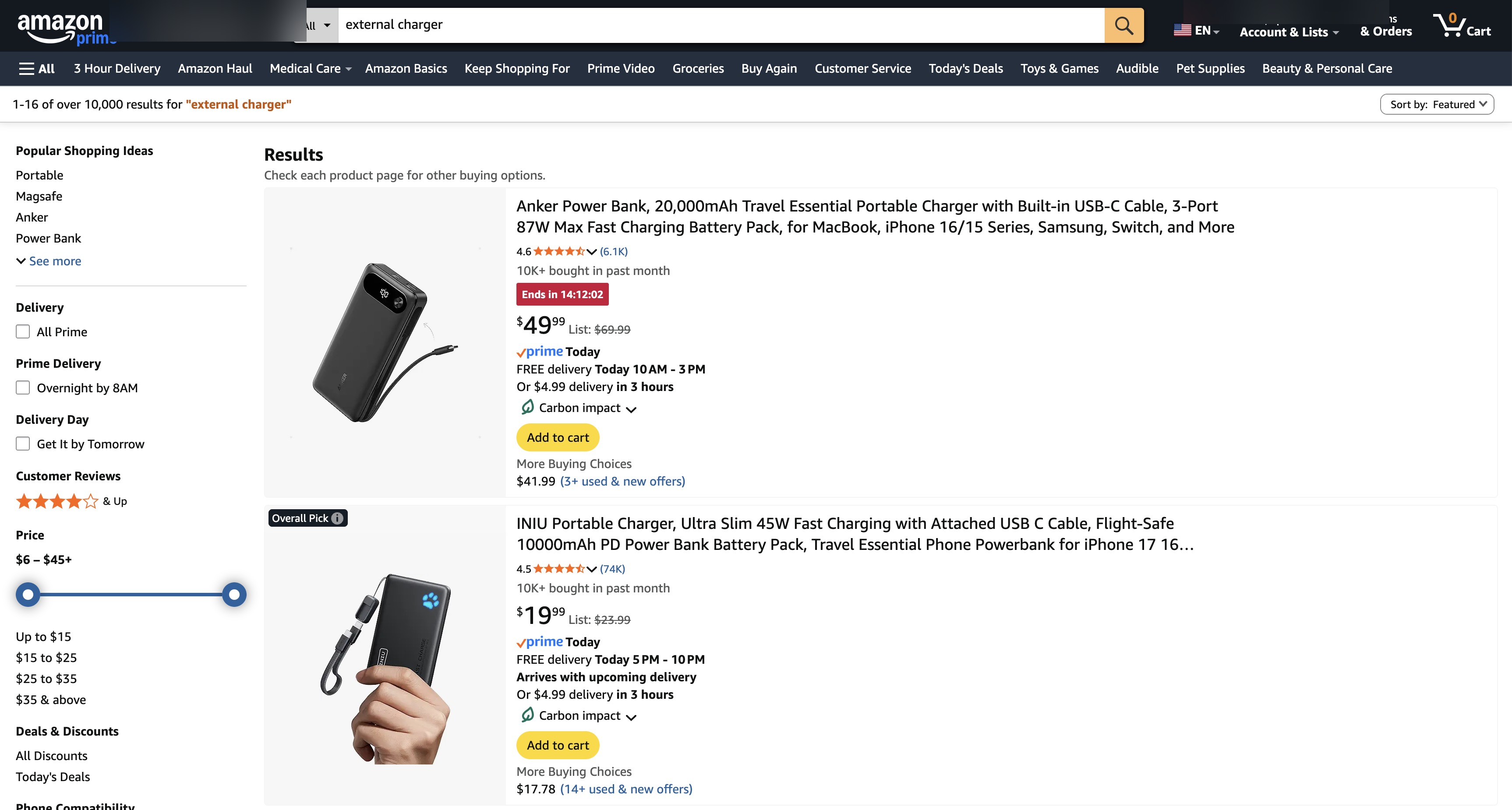
When you search for a product on Amazon or Google, the top results are often paid placements—the product didn't earn that spot, the seller bought it. Ad blockers strip these out so you see actual results ranked by relevance, not by advertising budget.
2. Switch your browser
Google Chrome (62) is made by the largest advertising company on Earth. Google has trackers on 75% of the top million websites. In 2024, Google removed the full version of uBlock Origin from Chrome and replaced it with a weaker “Lite” version. Google said the change was about security, but the Electronic Frontier Foundation called it “deceitful and threatening”—because the company that makes most of its money from ads also controls the browser you use to block them. A peer-reviewed study later found that ad blockers still work on Chrome, but only because open-source developers fought to work around Google's restrictions. That's not a company looking out for you.
Firefox (19) is the simplest fix. It's independent, privacy-focused, and runs the full version of uBlock Origin with no restrictions. It's made by Mozilla, a nonprofit. One thing to change after installing: Firefox defaults to Google as its search engine—switch it to DuckDuckGo or Brave Search in settings.
Brave (26) is built on the same engine as Chrome, so websites look and work the same. It has a built-in ad blocker and tracker blocker that work out of the box, with no extensions needed. If you want Chrome's compatibility without Chrome's surveillance, Brave is the closest option.
Both take about 10 minutes to install, import your bookmarks, and set as default.
3. Switch your search engine
Google Search (72) is the front door to the surveillance pipeline. Every query reveals what you're thinking about, what you need, what you're worried about. That data is the foundation of the most profitable ad targeting system ever built.
But Google Search also has a quality problem. As you saw in the Amazon screenshots above, many of the results you see on a first page aren't the best answer to your question—they're paid placements. Google has the same issue: ads that look almost identical to real results sit at the top of every commercial search. Internal emails released during the DOJ antitrust case showed that in 2019, Google's ads team declared a revenue emergency and pressured the search team to prioritize growth. The head of search at the time, Ben Gomes, warned that search was “getting too close to the money.” He was replaced by the head of the ads division. A year-long study by German university researchers confirmed what users already felt: search results are getting worse, dominated by SEO spam and affiliate content, and Google is losing that fight.
DuckDuckGo (12) doesn't track you, doesn't profile you, and delivers solid results. If you ever need Google results for a specific search, type !g before your query—DuckDuckGo will redirect you to Google for that one search. One caveat: in 2022, researchers discovered DuckDuckGo's mobile browser was allowing Microsoft trackers due to a syndication deal. They've since fixed it, but it's a reminder that “privacy-focused” companies still make compromises.
Brave Search (18) uses its own independent index (not repackaged Google/Bing results) and doesn't track users. It's the most credible attempt at building a major search engine without surveillance.
Changing your default search engine takes 30 seconds in any browser's settings.
4. Use a password manager
Reusing passwords is the single biggest security risk for most people. When one service gets breached (and they all eventually do), attackers try those credentials on every other service. If you use the same password for your email and your bank, one breach compromises both.
Bitwarden (15) is free, open source, and works on every platform. It generates unique passwords for every site, stores them encrypted, and auto-fills them when you log in. You only need to remember one master password.
1Password (26) is not free ($3/month) but has a more polished interface and excellent family sharing. It's a good option if you want to set up password management for less technical family members.
Proton Pass (14) is worth considering if you want to go deeper on privacy. It's free, open source, and end-to-end encrypted. On its own it's a solid password manager. But the real value is Proton's Unlimited plan, which bundles several tools this guide recommends: ProtonMail (15) for encrypted email, SimpleLogin (16) for email aliases, Proton Drive (15) for encrypted cloud storage, and a VPN. Instead of stitching together separate services, you get a single privacy-focused ecosystem from a Swiss nonprofit. It's the closest thing to a one-stop de-shittification kit.
Once you have a password manager, enable two-factor authentication (2FA) on your most important accounts—email, banking, social media. Both Bitwarden and 1Password can store and auto-fill 2FA codes. Even if your password is compromised in a breach, 2FA stops attackers from getting in.
The initial setup takes about an hour—installing the app, importing existing passwords, and updating your most important accounts. After that, it saves you time on every single login.
5. Audit app permissions
Your phone apps request access to your camera, microphone, location, contacts, photos, and more. Most of them don't need half of what they ask for. A flashlight app doesn't need your contacts. A weather app doesn't need your microphone.
On iOS: Settings → Privacy & Security. Review each category (Location, Camera, Microphone, Contacts, etc.) and revoke access for apps that don't need it. Set location access to “While Using” instead of “Always” wherever possible.
On Android: Settings → Apps → Permissions. Same review process. Android also lets you set permissions to “Ask every time,” which is useful for sensitive permissions like camera and microphone.
This takes about 10 minutes, requires no technical skill, and immediately reduces how much data apps collect about you in the background.
6. Use encrypted messaging
Signal (7) is the gold standard: end-to-end encrypted, open source, funded by a nonprofit foundation. It collects essentially no data about you—not your contacts, not your messages, not your metadata. Even if Signal's servers were seized, there would be almost nothing to find.
WhatsApp (44) uses Signal's encryption protocol, so message content is encrypted. But it's owned by Meta and collects extensive metadata: who you talk to, when, how often, your phone number, your contacts list, your device information. The message content is private, but Meta knows everything about your communication patterns.
iMessage (42) is encrypted for Apple-to-Apple conversations. Apple adopted RCS in 2024, replacing SMS for cross-platform texts, and end-to-end encryption for iPhone-to-Android RCS messages is in testing. But iMessage still locks you deeper into Apple's ecosystem—another form of platform lock-in.
Start by moving your most important conversations—family, close friends—to Signal. You don't need to convert everyone at once.
7. Take control of your email
Google stopped scanning Gmail (62) for ad targeting in 2017, but that doesn't mean it stopped reading your email. Gmail's “smart features” still parse every receipt, flight confirmation, and newsletter to track your purchases, travel, and habits. In 2025, Google integrated Gemini AI into Gmail with access to your messages—prompting a class-action lawsuit alleging it was done without meaningful consent. Your email feeds Google's profile of you whether or not it shows you ads based on it.
ProtonMail (15) offers end-to-end encrypted email based in Switzerland, with strong privacy laws and no advertising model. The free tier gives you 1 GB of storage and a proton.me address. Paid plans add custom domains and more storage. One honest caveat: Proton has complied with government data requests when legally compelled—including logging an activist's IP address in 2021. The encryption itself held (message content stayed private), but metadata like IP addresses and recovery emails are not zero-knowledge. No provider is above the law, which is why layering protections matters.
Email aliases are a powerful privacy tool even if you keep your current email provider. SimpleLogin (16) (now owned by Proton) lets you give every website a unique email address—it's free, open source, and works with any provider. Apple's Hide My Email does the same thing but requires iCloud+ and an Apple device. When a service starts spamming you, disable that alias instead of unsubscribing (which often doesn't work). You also know exactly which service sold or leaked your address.
Email migration is the highest-effort item on this list—you need to update accounts, notify contacts, and forward old mail. But the impact is significant: email is the central hub of your digital identity, and moving it out of the surveillance pipeline protects everything connected to it.